Empire Packaging Enterprise

Please help support my local business in Sabah, Malaysia by like and share please, thank you.

We provide services to those who need customized printed/plain carton boxes, corrugated boxes, die-cut boxes and many more. We also provide packaging materials such as single face, OPP tapes, stretch film and bubble wrap. In contrary, we also provide cake boards.

Search Box

Showing posts with label merge. Show all posts

Thursday, August 9, 2012

Tamer's Equipment Guides - Attributes Part III

Effect of Attributes

So, after we equip the equipment that merged with attributes, then that's it? No no no, look at the picture below


digimon masters online equipment, glove

digimon masters online equipment

% Apply Att


Yes, 55% Apply Att means that out of the attributes that you merged with your equipment, only 55% of it will implemented to your tamer's stat. Whereas if it is a 100% Apply Att, then your tamer will implement 100% from the merged attributes.

Equipment with slots and % Appy Att can be obtain by scanning a normal digiegg. Below is it table for % Apply Att on each available equipment.

digimon masters online equipment

Most of the equipment applied the above Apply att %, Attributes and no. of slots, except for the equipment that buys from a NPC where there is no slot available for attributes.

Cash item equipment tends to have 100% Apply Att even for Jacket, Pants and Gloves.


Tamer's Stat


digimon masters online equipment, stat, status

From the picture above, the attack 57 indicates the basic attack of tamer, while the 81 attack indicates the attack increase from attributes of equipment.


Tamer's Equipment Guides - Attributes

Tamer's Equipment Guides - Attributes Part II ( How to use Attributes )

How to use attributes


First is to Analyze it 


To use attribute, you must identify it at <Equipment Merge> NPC and select attribute analysis.


digimon master online attribute

After that, put in the attribute that you want to analysis, for example, I am gonna analyze HP Attribute Rank B.  

digimon masters online attribute, hp attribute, attribute rank

Then just click the Analysis button on the bottom right, however, every analysis do require some fees, the higher the rank and class of the attribute, the higher the fees.  After the attribute is analyzed, it should look like the picture on the right.

digimon masters online attribute, rank attribute, hp attribute

Do notice that the hp increase in within the range 40 - 50, which means, the highest hp increase you can get from this HP Attribute Rank B is 50 and the lowest is 40.

Second is to Merge the attribute with equipment


After this, you just need to merge the attribute to the piece of equipment that it is connected with, for example HP Attribute is and attribute for Jacket.

To merge, simply select the Equipment Merge

digimon masters online attribute

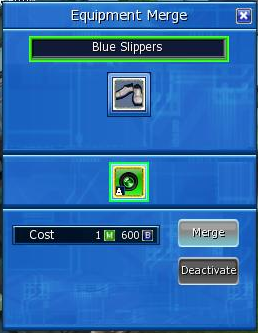
Then simply merge the attribute to the connected equipment, for example Shoes merge with MS attribute. Same as analyzing the attribute, merging also require fees and increase as the rank and class of the attribute are higher.

digimon masters online attribute, attribute merge

Removing attributes


Yes, attributes can be removed from the equipment, simply also select the Equipment Merge from the NPC. Then click the attribute to be remove and select deactivate.

digimon masters online remove attribute

Do mind the the fees require to deactivate the attribute is much higher than analyzing and merging. And is same with analyzing and merging, fees gets higher with rank and class.


Tamer's Equipment Guides - Attributes